Apply The Brand
Apply the Brand
Communicating effectively and responsibly is a shared effort across the University of South Dakota. Whether you are designing materials for a student organization, updating official contact information, or managing digital content, staying aligned with USD's brand identity ensures our work remains professional, legally compliant and accessible to everyone.
Explore the resources below to find approved templates, style guides and requirements to guide your next project from start to finish.
We all share a responsibility to prioritize accessibility. Please take the needed steps to ensure any digital content and resources you create are accessible. This supports our efforts to follow digital accessibility regulations and guidelines, but more importantly, it promotes an environment where all students, faculty and staff have the opportunity to access all digital content in the formats they need or which serve them best.
When you work with Marketing Communications & University Relations, please share the ways in which you plan to use the requested content so we are prepared to account for the needed digital accessibility considerations. Greater lead time may be needed, and there may be additional costs associated with graphic design projects that require extensive remediation.
Federal Laws and Regulations
- Section 504 of the Rehabilitation Act (1973): Prohibits discrimination against individuals with disabilities in programs and activities receiving Federal financial assistance.
- Americans with Disabilities Act (ADA) Title II (1990): Requires public entities to ensure their services, programs and activities are accessible to people with disabilities.
- Section 508 of the Rehabilitation Act (1998): Applies to federal agencies and requires electronic and information technology to be accessible to individuals with disabilities.
General Principles
- WCAG 2.1 Compliance: USD strives to meet the Web Content Accessibility Guidelines (WCAG) 2.1 Level AA conformance standards set forth by the World Wide Web Consortium (W3C).
- Usability Testing: Regularly conduct usability testing with users with disabilities to identify and address accessibility barriers.
- Continuous Improvement: Accessibility is an ongoing process. USD is committed to continuous improvement and implementing new technologies to enhance accessibility.
Accessibility Requirements
- Text Alternatives: Provide alternative text descriptions (alt text) for all images to convey their meaning to users who cannot see them.
- Keyboard Accessibility: Ensure all interactive elements on websites and digital content are fully operable using a keyboard alone.
- Color Contrast: Maintain sufficient color contrast between text and background to ensure readability for users with visual impairments.
- Headings: Use clear and logical heading structures to improve navigation for screen reader users.
- Multimedia Accessibility: Provide captions and transcripts for video content and audio descriptions for complex visuals.
- Error Identification and Correction: Implement mechanisms for users to identify and report accessibility barriers.
Technical Resources
- W3C Web Accessibility Initiative (WAI): Provides resources, tools and guidelines for creating accessible web content.
- US Department of Education Office for Civil Rights (OCR): Offers information and guidance on digital accessibility requirements for educational institutions.
Additional Considerations
- Mobile Compatibility: Ensure all digital content is accessible and user-friendly on mobile devices.
- PDF Accessibility: When using PDFs, ensure they are tagged and contain proper document structure for accessibility tools.
- Procurement: Factor accessibility into the procurement process when acquiring new digital technologies.
Benefits of Digital Accessibility
By creating digitally accessible content, USD can:
- Fulfill its legal obligations under federal law.
- Broaden access to its educational resources and programs.
- Enhance the user experience for all visitors, including those with disabilities.
- Improve search engine optimization (SEO) by making content more discoverable.
USD's commitment to digital accessibility ensures a more inclusive and equitable online experience for everyone. By following these guidelines and staying current with evolving accessibility standards, USD can continue to provide a welcoming and accessible digital environment for its diverse community.
Email Best Practices
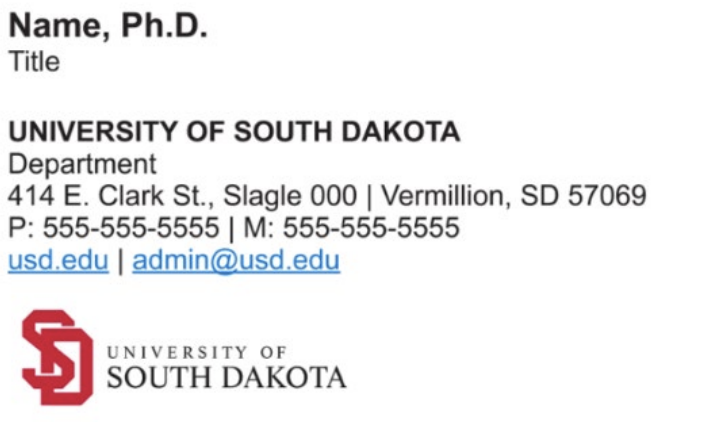
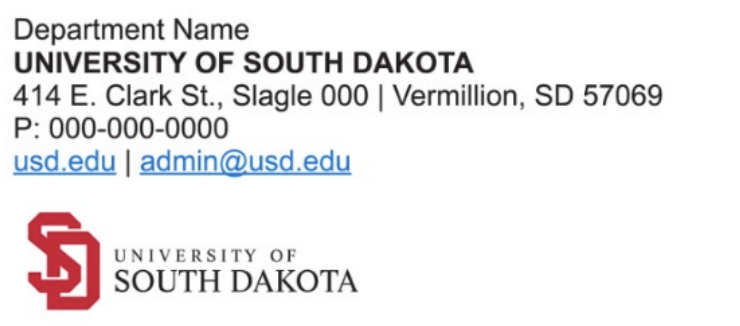
In keeping with BOR Policy 1.7.6, USD has developed branded templates for contact information provided in official communications. You can update your contact information using USD's email signature creator.
Examples of approved contact information for employees and departments are provided below. Contact information should not exceed what is provided below but may contain fewer contact information items if desired, as long as relevant contact information is clearly displayed. Employees or departments may also choose to add certain professional disclosures as outlined in the policy (such as legal privileges/confidentiality applicable to the communication).
Social media icons linking to official university accounts (i.e., USD's Facebook, Instagram, YouTube, LinkedIn and X accounts) or college/school accounts are permitted.
Employee Email Signature Example:
Department Email Signature Example:
Titles
Titles are limited to one's official USD job title as designated by HR. Most individuals will have only one title, but individuals who hold multiple titles within a department (e.g., "Associate Professor, Graduate Program Coordinator") may display those titles.
Web Links
Web links in contact information are limited to official university websites. This includes the USD public website (i.e., usd.edu), as well as webpages on the USD public website (e.g., usd.edu/Academics). You may instead choose to link to the following websites that are owned and operated by the university or that are connected to official university accounts: GoYotes.com, USDAlumni.com, Coyote One Stop, Coyote Connections, Zoom links and Microsoft Bookings pages.
Faculty who wish to link to their bio page on the USD website may include the text "My Professional Webpage" and hyperlink to their official USD directory page. If you would like to request that another official university website be considered for approval, please contact Marketing Communications & University Relations at [email protected]. Personal websites, Google sites or other external and unofficial sites are not permitted.
Logos
USD's primary academic logo (pictured in the examples) has been designated as the logo permitted in contact information for official communications. Employees within a USD college or school may elect to use their assigned college/school logo. Athletics staff may elect to use the primary athletic logo (i.e., the paw logo). Please visit Design & Print Studio to download logo files that are sized for email. Other logos and graphical marks, or logos and graphical marks associated with a department you are not affiliated with, are not permitted.
Brand templates help you use the USD brand quickly and easily. Whether you are in need of a new business card or working on a flyer, our templates will help you apply the USD brand to your projects. If you do not see a template that meets your need, contact the Creative Services team.
Office Resources
PowerPoint
- PowerPoint Presentation - University Logo
- PowerPoint Presentation - Intercollegiate Athletics
- PowerPoint Presentation - Arts & Sciences
- PowerPoint Presentation - Beacom School of Business
- PowerPoint Presentation - School of Education
- PowerPoint Presentation - College of Fine Arts
- PowerPoint Presentation - Graduate School
- PowerPoint Presentation - USD School of Law
- PowerPoint Presentation - Sanford School of Medicine
- PowerPoint Presentation - School of Health Sciences
Don't see what you are looking for? Check out the Design & Print studio for more options.
To protect the University of South Dakota brand identity, all items bearing USD trademarks—including department clothing, table banners and student organization merchandise—must be produced by a licensed vendor and approved by Creative Services.
At the University of South Dakota, we strengthen our brand when we communicate responsibly. Part of that responsibility is ensuring USD websites contain accurate, accessible information that follows set standards while reflecting the USD brand.