
Brand Visuals
Brand Visuals
Visuals play a vital role in telling the University of South Dakota story.
Whether using professional branding photography, authentic user-generated content, dynamic video production or print collateral, every visual asset should reflect the university's core identity and maintain a consistent, high-quality standard.
The guidelines, technical specifications and resources in this section are designed to help communicators accurately and effectively represent USD across all digital and print platforms.
Colors
Primary Colors
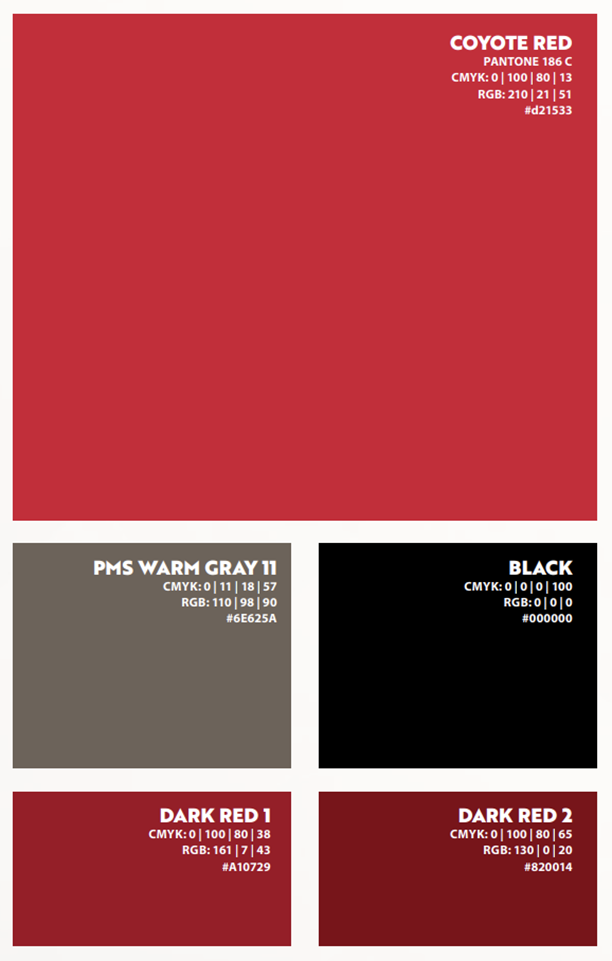
USD's primary colors are PMS 186, black and PMS 422. PMS 186, when used in four-color printing, should be built as shown.
Accent Colors
USD's accent colors are Warm Gray 9, Warm Gray 11, PMS 716, PMS 730, PMS 2622 and PMS 323 (coated and uncoated).
Use these colors for four-color printing only. Do not use secondary colors in apparel, textiles, memorabilia, etc.

Neutral Colors
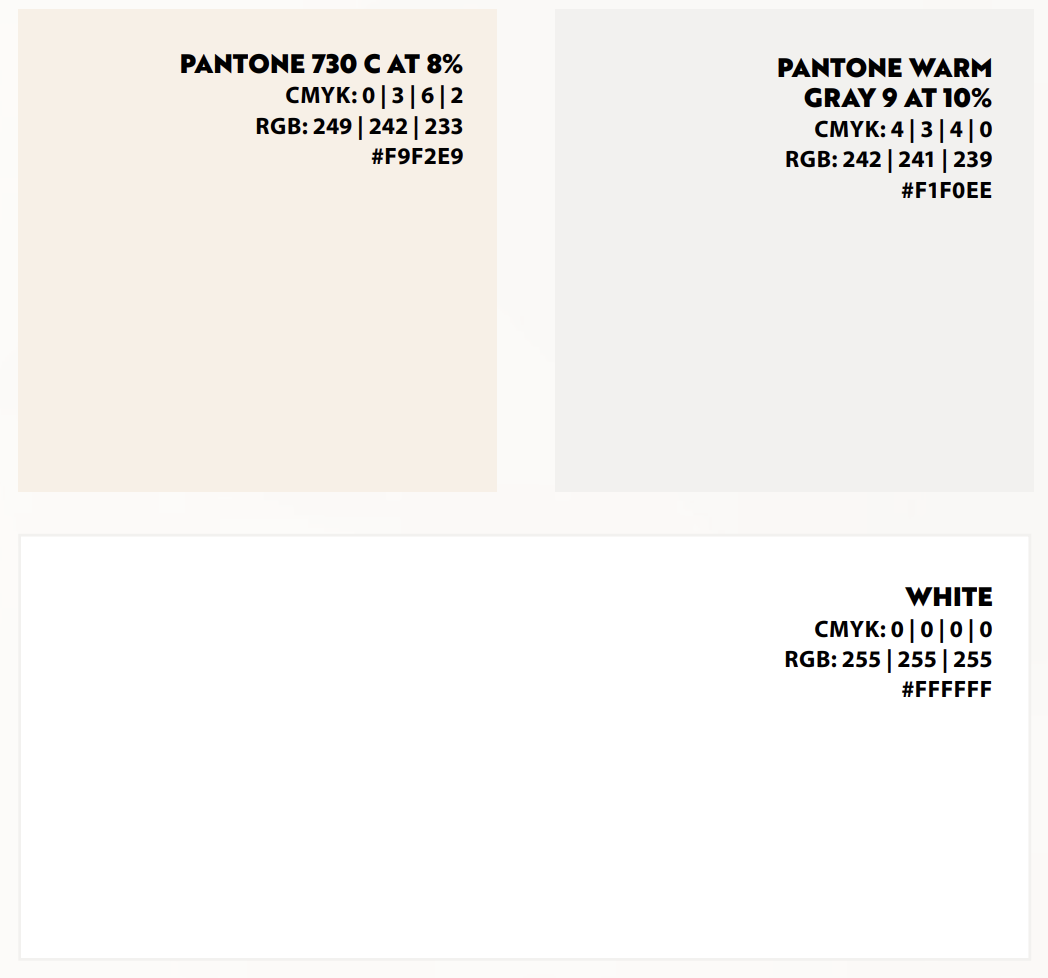
USD's neutral colors are lighter shades that form the base of the USD color palette and are used frequently for backgrounds and text over primary and accent colors. PMS Warm Gray 9 at 10% and PMS 730 8% create a light gray shade and a light beige shade.
White is always available as a Primary, Accent or Neutral Color in the USD Brand.
Typography & Font Pairings
University Typefaces
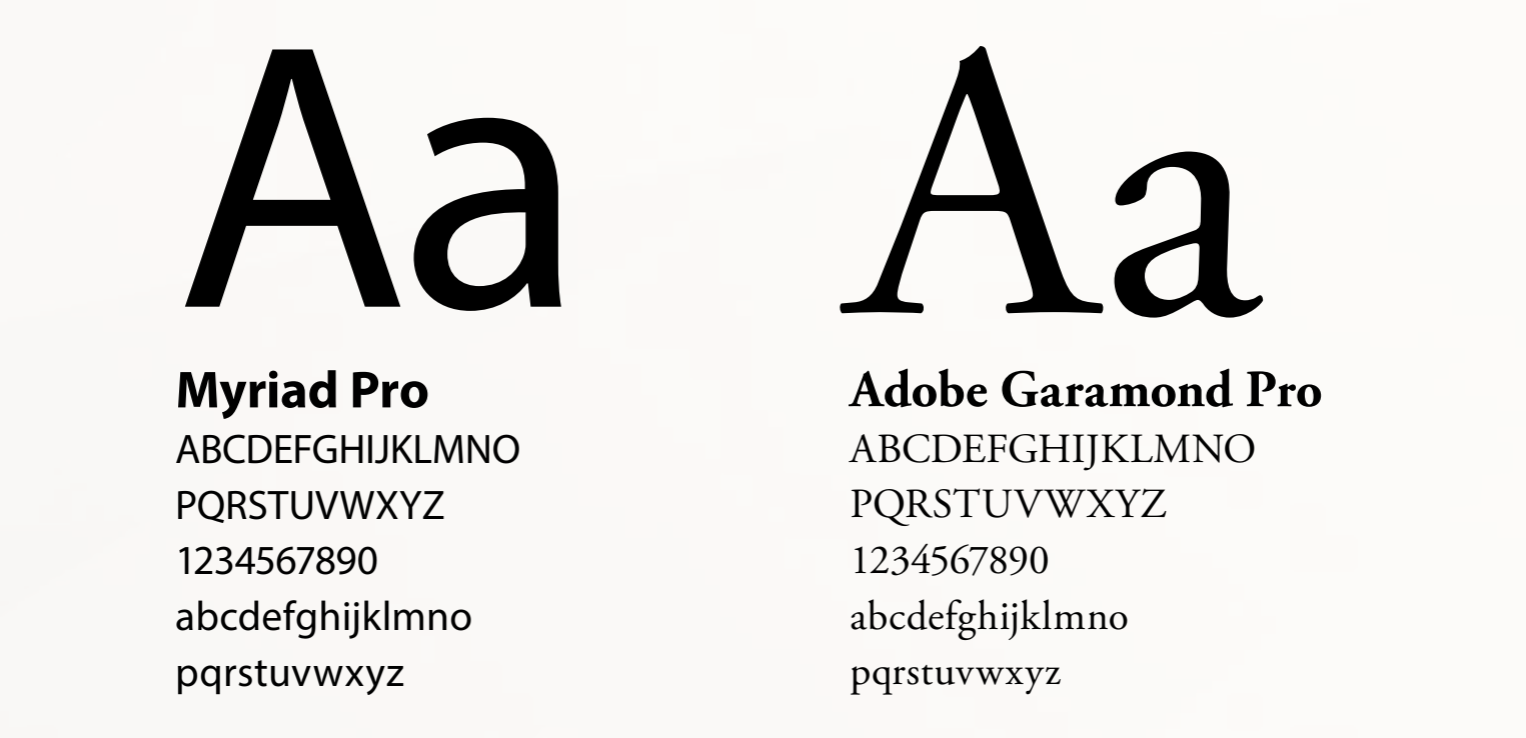
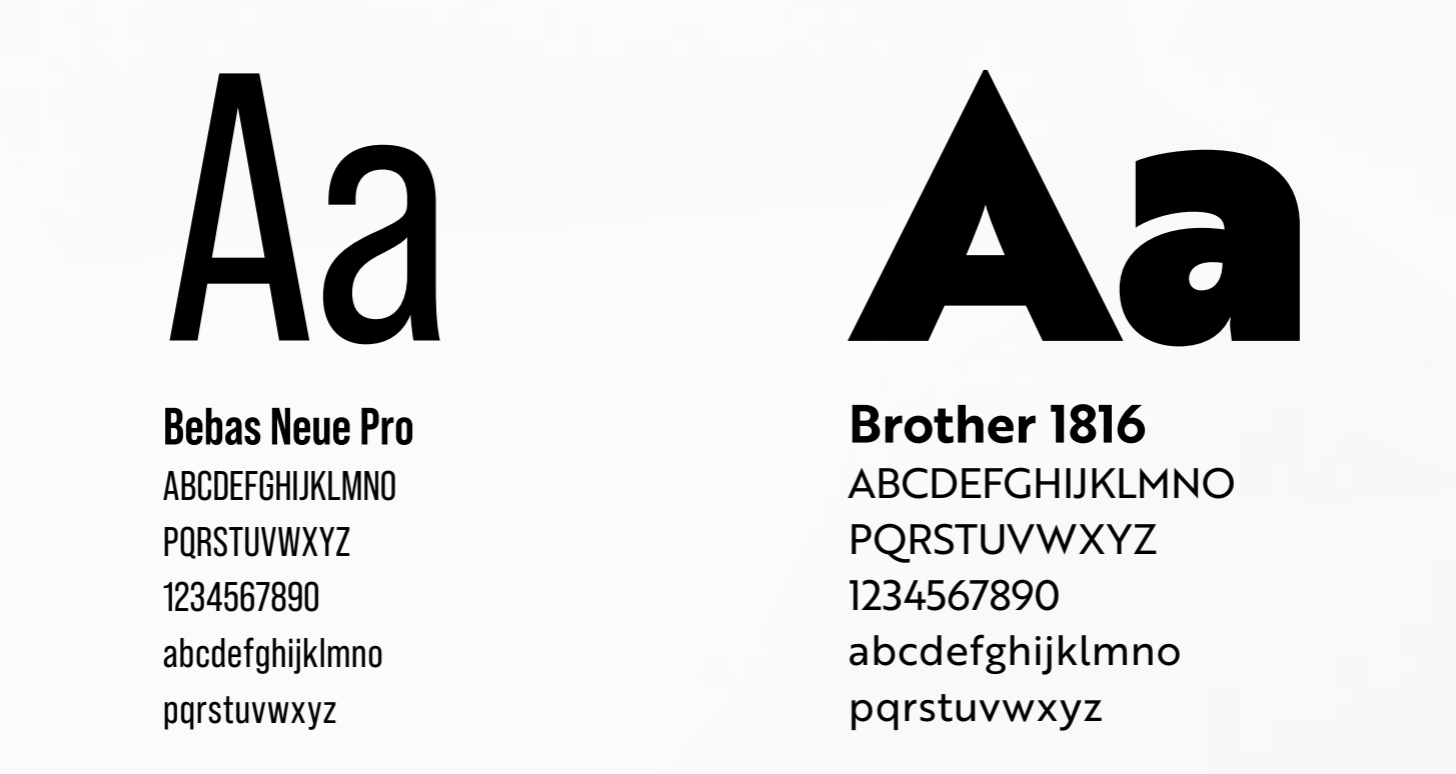
Two typefaces have been designated as USD’s universally-used body copy fonts: Adobe Garamond Pro and Myriad Pro. Two typefaces have been designated as USD’s universally-used heading and sub-heading fonts: Bebas Neue Pro and Brothers 1816.
Headlines and Subheadings
- Bold
- Semibold
- Condensed
- Extended
Body Copy
- Regular
- Light
Cutlines and Captions
- Light
- Italics

The University of South Dakota Design and Print Studio is located in the Continuing Education Building on the Vermillion campus. The studio offers many design, print and production services including but not limited to: graphic design, lamination, foam board mounting, large format and photo prints. Most print jobs can be produced on campus including direct mail pieces.
USD Policy 2.049 outlines that campus services such as Creative Services & Print Shop must be utilized if the supply or service is available.
The online studio offers many free services with your USD login including:
- Business Cards
- Name Plates
- Design Templates
- Price Estimates
- Logo Downloads
- Store Project Files
- Submit to Print
University Logo Standards
Our logo serves to identify the university in all forms of communications. It must be used consistently and correctly in all communication efforts to present a unified image to our audiences. Please see Graphic and Editorial Standards for acceptable and unacceptable logo usage, placement and colors.
- The logo is restricted to official university entities only; it is not to be used by student groups and organizations, on personal and organizational websites, social media or any other unofficial university representation.
- All university logos and their uses are subject to interpretation and approval by Creative Services.
- The horizontal logo is acceptable when available space does not permit use of the primary logo.
- Colors are PMS 186 and black.
View Our Athletic Logo Guide View General Brand Guide
University of South Dakota Logos
Download logos using the links below.
- If you require a format other than those below (for example, black and white or reverse color), email [email protected] to request it.
- Resize logos proportionally by holding down the Shift key while using the resizing handles.
University of South Dakota
- Vertical Logo
- Vertical Logo (All Black)
- Vertical Logo (White Text)
- Horizontal Logo
- Horizontal Logo (All Black)
- Horizontal Logo (White Text)
University of South Dakota: College of Arts and Sciences
University of South Dakota: Beacom School of Business
University of South Dakota: School of Education
University of South Dakota: College of Fine Arts
University of South Dakota: School of Health Sciences
University of South Dakota: Knudson School of Law
University of South Dakota: Sanford School of Medicine
University of South Dakota: Graduate School
Video is one of our most powerful tools to capture Coyote pride and share the University of South Dakota story. Whether you are spotlighting groundbreaking research, campus traditions in Vermillion, or student success, your video content reflects USD’s brand identity.
To maintain a cohesive visual identity across the USD website, all video content created by departments, partners, or external vendors must adhere to the formatting and technical guidelines outlined below.
Brand Fonts & Typography
To maintain brand consistency, follow these typography rules across all video elements:
- Primary Font: DIN Condensed (This is the only font permitted for use in the lower thirds)
- Alternative Font: Bebas Neue Pro
- Text Formatting: Always use ALL CAPS throughout all videos.
Lower Thirds
Lower thirds identify speakers and provide context while maintaining a clean look:
- Name: Plain white font in Din Condensed for the person's first and last names.
- Title: A red box directly beneath the name containing white text specifying the person's official title.
- Placement: Position the full name and title graphic in the bottom-left quadrant of the video frame.
End Cards & URLs
End cards guide viewers on where to learn more after watching:
- Campaign URL: Display the applicable campaign or landing page web address (e.g., coyoteready.com or usd.edu/siouxfalls).
- Logo: Include USD’s all-white horizontal logo.
Miscellaneous Best Practices & Accessibility
Ensure your footage meets USD's quality standards and digital accessibility requirements:
- Transitions: Hard cuts only. Do not use dissolves or cross-fades between video clips.
- Captions: Every web video must be accompanied by a separate .srt file containing accurate transcriptions to enable closed captioning.
Helpful Resources & Actions
- In the Den Series: Reference our standard video format style guide.
- USD Logos: Download official, high-resolution logo files for end cards.
- SRT Files: Learn more about creating and formatting .srt caption files.
Branding Photography
This type of photography is intended to be more than just a standard image; it is designed to emphasize and elevate a specific subject. It typically focuses on impactful posing, meaningful locations and bold contrast and color to create a stronger visual narrative.
- Emphasizes key brand pillars (Pillar 1: A Pathway to Purpose, Pillar 2: Led by Original Thinkers, Pillar 3: United by The Big Picture).
- High-contrast imagery featuring warm skin tones, bright highlights, and deep blacks.
- Confident posing and facial expressions.
- Intentional and impactful location choices that contribute to the overall story and message of the image.
User Generated Content (UGC) Photography
Student-provided photography allows the authentic and genuine atmosphere of the department, school. Or campus to naturally shine through. This style of imagery helps foster connection and community while also conveying a modern, current representation of campus life. It is especially effective for platforms such as social media, where authentic and engaging content resonates with audiences.
Candid Moments
This style can align closely with the same principles as user-generated content, as candid imagery captures authentic and genuine moments between individuals or groups. Candid photos help create a sense of interaction, connection, and rapport that feels natural and relatable. Avoid overly posed imagery, as prospective students can often distinguish between authentic moments and staged content.
People
Utilize warm, natural lighting, whether captured in-camera or thoughtfully simulated, to showcase authentic moments and highlight the diverse personalities of individuals engaged in their environment. Capture subjects in both landscape for traditional web and print, and portrait for social media and other vertical-format uses, ensuring maximum versatility across platforms.
Frame subjects in a way that tells a story or leans into the university, whether that is a doctor in a lab or a teacher in a classroom. Be sure to leave some dead space in some imagery as well to allow for graphics to be placed.
Campus
When photographing campus landmarks and buildings, capture a variety of compositions rather than relying on a single perspective. For example, place a building such as Old Main in the center of the frame, position it off-center, incorporate foreground elements like trees, or focus on only a portion of the structure to create visual interest.
- Include detail shots with tighter crops to help enhance the atmosphere and storytelling of the image. For example, the Old Main bell tower is on each building sign pole.
- Capture multiple angles and perspectives. Buildings can appear dramatically different when viewed from unique vantage points, so experiment with low angles, elevated perspectives, and less commonly photographed sides of the structure.
- Whenever appropriate, prioritize shooting with a shallow depth of field to create subject separation, draw attention to key elements, and produce a more visually engaging image. (Camera: F/2-F4)
Off-Campus
It's always great to include the community; this imagery can be used to tell more of a story or to fill space when talking about USD or Vermillion.
Education & Hands-On Learning
When it comes to education, we have so much to show and so many groups to emphasize. While each group is very different, we look for the same style each time. We want group collaboration, dedication to their craft, and emotion.
- Try to get both tight and wide shots; this will allow you to capture the group in a single image, along with some detail imagery of what they are doing.
- Frame the subject in the image that shows a sense of engagement.
- Be part of the group (if able), photos from the perspective of the student allow for the outside world to feel like they are a part of what is happening at USD.
- Create opportunities for individuals to present information, demonstrate expertise, or lead group discussions, highlighting leadership and engagement within the group.
- Try to get a variety of angles as well; these can range from lower/higher angles to different angles around a room.
Photo Editing and Manipulation
All photographs should undergo the following post-production adjustments to ensure they meet quality standards and are optimized for use across both print and digital applications:
- Lens Correction
- Exposure
- Contrast
- White Balancing
- Cropping
- Clarity
- Color Correction
- Saturation and Vibrance
The following manipulations CAN be used:
- Removal of non-permanent objects
- Trash, dust, water droplets on lens, vegetation, etc.
- Removal of logos or designs on clothing for marketing purposes
- Removal of minor skin blemishes or stray hairs
The following manipulations CAN NOT be used:
- Altering the facial expression of a person in an image
- Drastically changing a person's skin tone
- Removing or placing people into a group photo
- Altering the color of industry standard materials (e.g., Medical gloves)
Crediting, Releases and Policy
By agreeing to participate in a photo, video, or audio recording by the USD Marketing Communications & University Relations team, participants grant the university full rights to publish, distribute, and display their image or voice across any format or media.
When you are in a public space on or around campus (such as outdoor walkways, common areas, or public events), there is no legal expectation of privacy. University photographers and designated staff are legally permitted to take photographs and capture video in these areas. For example, individuals featured or visible in the background of photos taken at public university events (e.g., athletic games, open campus ceremonies) may be included in images published for USD promotional, marketing, or archival purposes without separate release forms.
Privacy
Family Education Rights and Privacy Act (FERPA)
Communications professionals at the University of South Dakota who share information related to students or educational records must understand and comply with FERPA. FERPA protects the privacy of the educational records of both current and former students.
Health Insurance Portability and Accountability Act (HIPAA)
Communications professionals at the University of South Dakota who share any individual health-related information must understand and comply with HIPAA. HIPAA protects the privacy and security of personal health information.
USD Photography Guidelines in Action
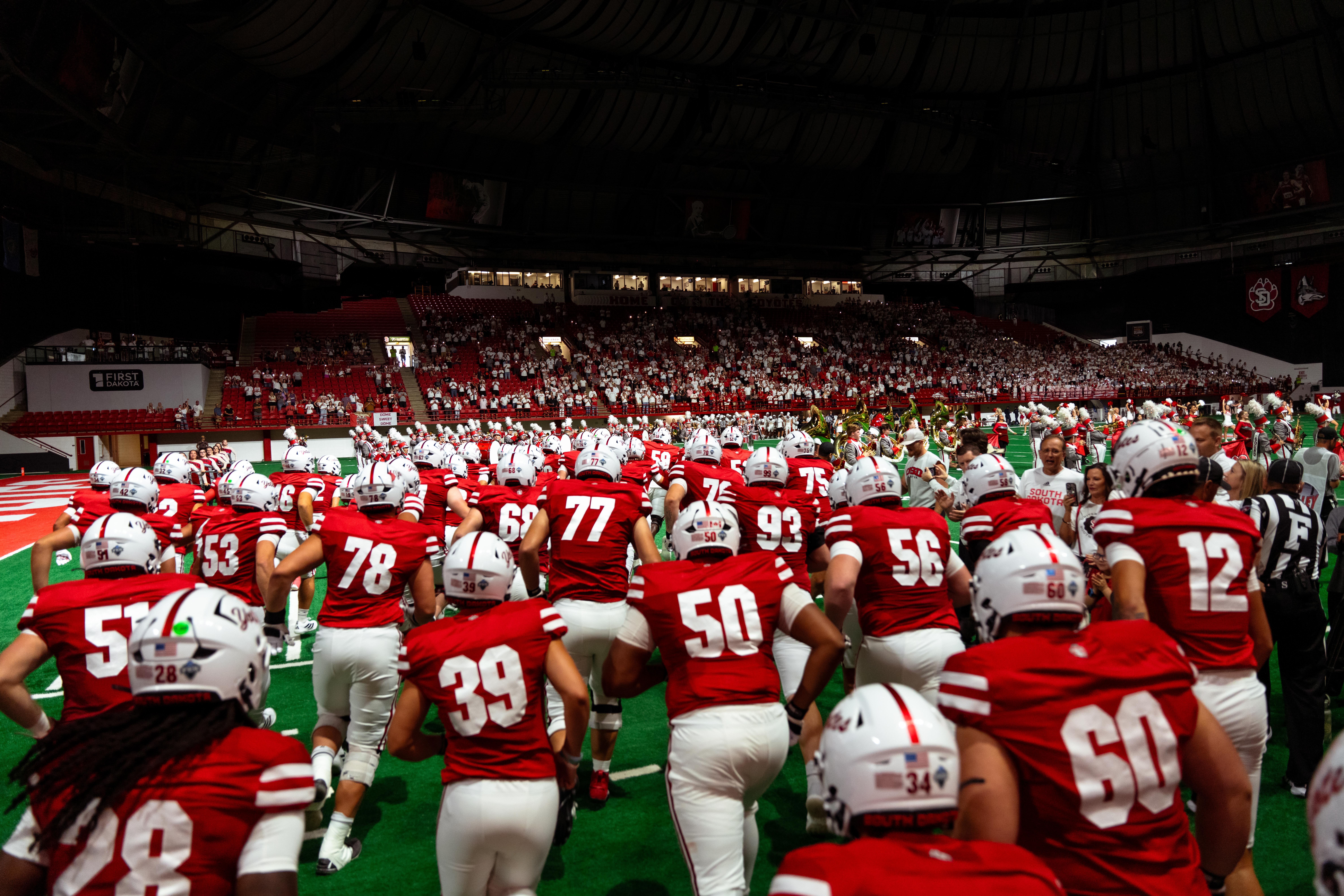
These images demonstrate how to capture the USD story effectively. Use them as a reference for tone, lighting, framing and subject engagement.